Keying in invoices is the most visible part of accounts payable work: header, lines, VAT and due dates, one invoice at a time. Automatic capture promises to remove it, but between reading an invoice and having it correctly posted in the ERP there are several steps, and every missing one lands back on your team.
What OCR does and what it doesn’t
OCR turns the image of a document into text. It knows the invoice says “1,240.00”, but not that it is the taxable base, which supplier it comes from, which company it belongs to or whether it was already posted last week.
Many tools solve this with per-supplier templates that tell the software where each field is. That works until the supplier changes its layout. With hundreds of suppliers, maintaining templates becomes another job.
What capture needs to do to actually save work
- Classify the document: tell an invoice from a delivery note, a credit note or a purchase order before doing anything with it.
- Extract header and lines: supplier, tax ID, number, dates, base, VAT, total and, when needed, each line with quantity and price.
- Identify supplier and entity: match the tax ID against the ERP supplier master and know which group company the invoice is addressed to.
- Check the data is consistent: base plus VAT adds up to the total, the tax ID is valid and the invoice isn’t already posted.
- Learn from corrections: if someone fixes a field for a supplier, the next document from that supplier should come out right.
Work out in a minute what managing supplier invoices costs at your volumes.
Calculate my savingsFrom data to ERP: the step that is usually missing
Extracting the data into a spreadsheet or an import file still takes work: someone has to check it, import it and fix whatever the ERP rejects. The real saving comes when the invoice is posted straight into the ERP, with its supplier, series, accounts and due dates. How Finaro integrates with your ERP.
What to review by hand and what not
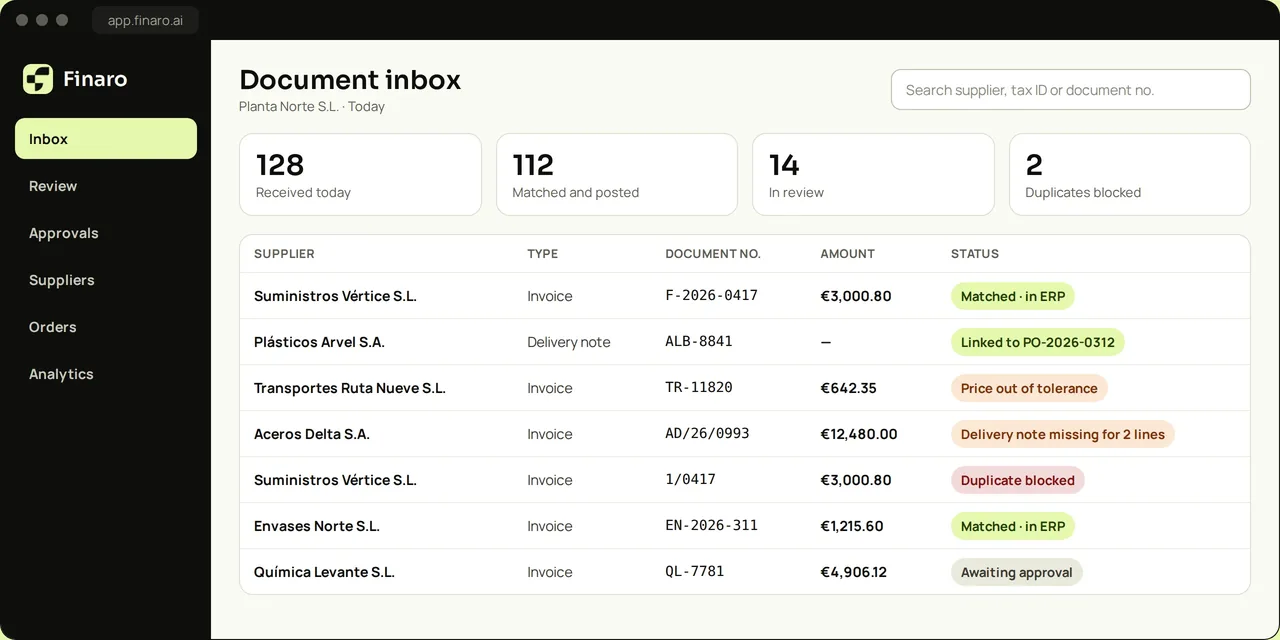
Automating doesn’t mean not looking; it means looking only at what needs it. A simple rule: whatever passes every check is posted on its own, and anything doubtful goes to a person with the reason flagged. Typical review cases:
- A new supplier that isn’t in the ERP yet.
- A field that couldn’t be read with confidence.
- An amount far from what is usual for that supplier.
- A possible duplicate invoice. How to catch duplicates.
How to know it works
- Share of invoices posted without any correction.
- Time from receiving the invoice to having it in the ERP.
- Corrections per supplier: they should fall over time.
- Duplicates blocked before payment.
What about mandatory e-invoicing?
When invoices arrive in a structured format, reading them stops being the problem. They still need to be classified, checked, approved and posted, and during the transition PDF, paper and structured invoices will coexist. What mandatory e-invoicing changes in Spain.
It classifies each document, extracts header and lines, identifies supplier and entity, blocks duplicates and posts to your ERP. Your team only reviews the exceptions.
Book a demo